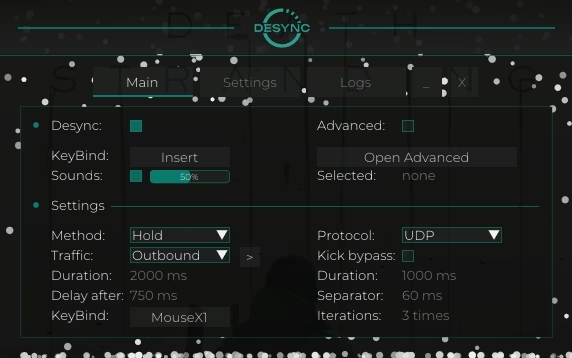
Enable desync - activating functions
Enable Keybind - hotkey for activating functions
Sounds - Sound accompaniment for actions (activation, etc.)
Advanced - process selection
Path - path to the target executable file/game, works together with Firewall mode
Method - select the activation method: Temporary, Pressing, Hold
Traffic - traffic blocking selection: Outbound, Inbound
Duration - the duration of the desync (without kick bypass, for the temporary method)
Delay after - the delay after blocking, before the ability to reactivate desync
KeyBind - hotkey for activating desync (primary key)
Protocol - select protocol block: UDP, TCP
Kick bypass – how to avoid game crashes due to a poor internet connection
Randomizator - randomization of block duration
Fix Traffic - a button to "heal" your internet if something goes wrong
Configuration Manager - tool for saving user settings
Overlay - lagswitch status overlay window
All logs - enables display of logs when blocking is activated
Delete Logs - delete log files
Log File - open a log file
Logs - displaying information about software operation